
Desktop App
A native desktop build (Wails v2) wraps the visual editor in its own window with multi-project switching, OS-keychain credential storage, first-run onboarding, and Ed25519-signed auto-update. Two binaries ship side-by-side: iterion (CLI) and iterion-desktop (this app).
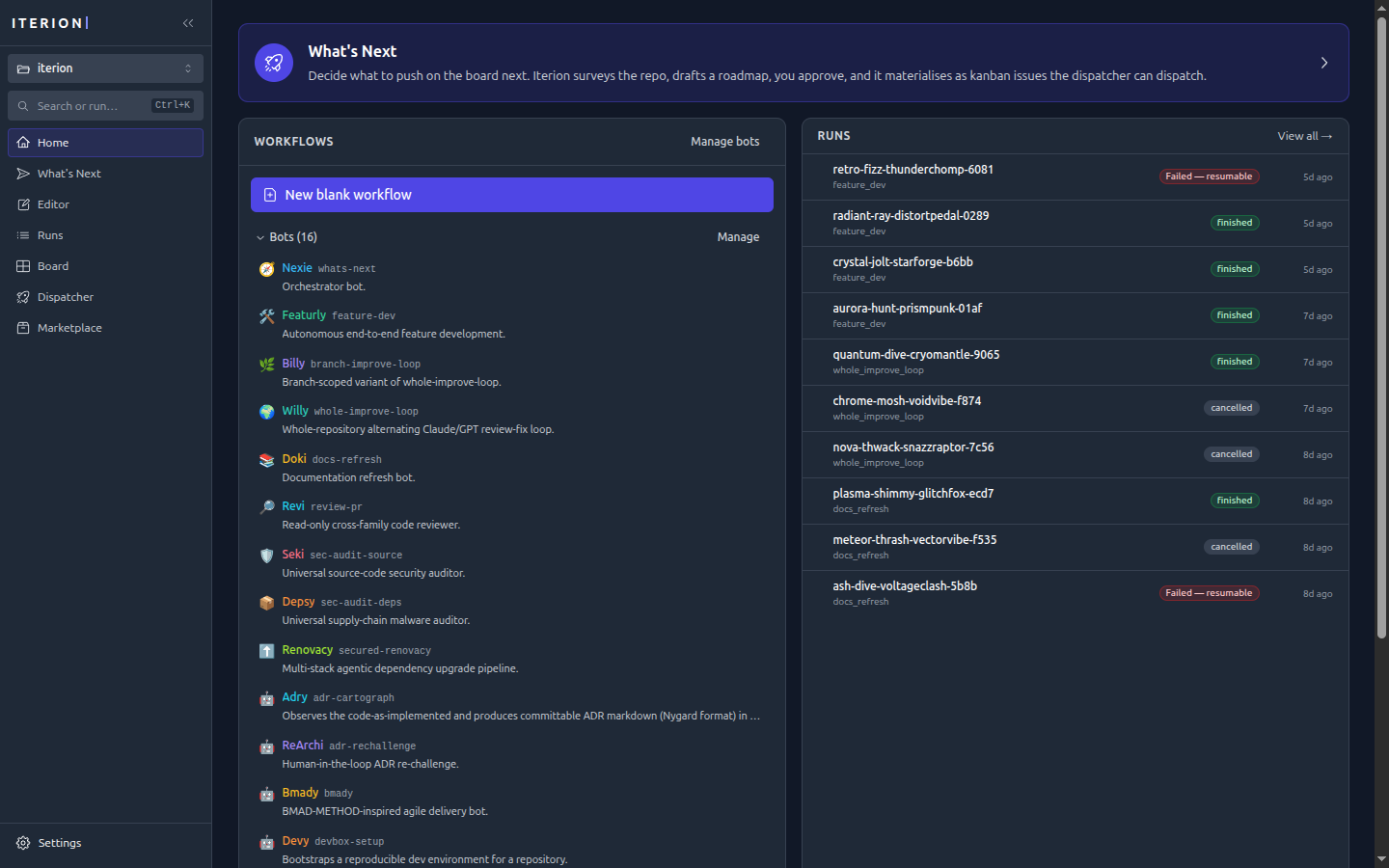
The desktop app embeds the same studio SPA, so the interface is identical to the web studio — same canvas, run console, board, and dispatcher — minus the browser chrome, plus a native window, project switcher, and OS keychain:
Install
Pick the artefact that matches your OS from the latest GitHub Release (filenames start with iterion-desktop-). Each tag publishes:
| Platform | File | Size | Notes |
|---|---|---|---|
| Linux x86_64 | iterion-desktop-linux-amd64.AppImage | ~110 MB | Self-contained, click-to-run |
| Linux x86_64 | iterion-desktop-linux-amd64.deb | ~16 MB | Debian/Ubuntu/Mint package — apt-managed install + uninstall, declares deps |
| Linux x86_64 | iterion-desktop-linux-amd64.tar.gz | ~16 MB | Raw binary + README; needs libwebkit2gtk-4.1-0 + libgtk-3-0 + libsoup-3.0-0 |
| Linux arm64 | iterion-desktop-linux-arm64.{AppImage,deb,tar.gz} | same | same |
| macOS Intel + Apple Silicon | iterion-desktop-darwin-universal.zip | ~80 MB | Universal .app (lipo'd, runs natively on both archs) |
| Windows x64 | iterion-desktop-windows-amd64.exe | ~50 MB | Portable single executable |
| Windows x64 | iterion-desktop-windows-amd64-installer.exe | ~50 MB | NSIS installer (per-user, Start Menu integration) |
| Windows arm64 | iterion-desktop-windows-arm64.{exe,-installer.exe} | same | same |
Linux
AppImage (no system deps):
chmod +x iterion-desktop-linux-amd64.AppImage
./iterion-desktop-linux-amd64.AppImage
Debian/Ubuntu/Mint (.deb — apt manages deps + uninstall):
sudo apt install ./iterion-desktop-linux-amd64.deb
iterion-desktop
Raw binary (smaller, requires WebKit + GTK runtime):
# Debian/Ubuntu/Mint/Pop!_OS:
sudo apt install libgtk-3-0 libwebkit2gtk-4.1-0 libsoup-3.0-0
# Fedora/RHEL:
sudo dnf install gtk3 webkit2gtk4.1 libsoup3

tar -xzf iterion-desktop-linux-amd64.tar.gz
chmod +x iterion-desktop
./iterion-desktop
macOS
The simplest path is Homebrew:
brew tap socialgouv/iterion https://github.com/SocialGouv/iterion
brew install --cask iterion-desktop
open -a Iterion
Or install manually from the release ZIP:
unzip iterion-desktop-darwin-universal.zip
xattr -d com.apple.quarantine Iterion.app   # one-off Gatekeeper unblock (V1 builds are unsigned)
open Iterion.app
You can also drag Iterion.app to /Applications/ for a permanent install.
Windows
- Portable : double-click
iterion-desktop-windows-amd64.exe. SmartScreen will warn ("Unknown publisher" — V1 is unsigned) → "More info" → "Run anyway". - Installer : run
iterion-desktop-windows-amd64-installer.exefor a per-user install with Start Menu shortcut.
First launch
The desktop app boots into a Welcome wizard that asks you to:
- Pick or create a project folder (a directory containing
.botfiles). - Configure API keys (stored in the OS keychain — Keychain on macOS, Credential Manager on Windows, Secret Service on Linux). Skippable; you can also rely on environment variables in your shell.
- Verify external CLIs (
claude,codex) detection — only needed if you usebackend: "claude_code"orbackend: "codex"in your workflows.
After onboarding the studio opens on your project. Multi-project switcher is in the top-left.
Auto-update
The desktop app polls GitHub for new releases every 4 hours (configurable in Settings → Updater) and offers in-app update on detection. Manifests and artefacts are Ed25519-signed.
Advanced — for contributors / power users
- desktop-build.md — local build flow + Docker reproducible builder + per-OS deps + cross-compile matrix
- desktop-architecture.md — proxy-based AssetServer architecture
- desktop-distribution.md — release signing + Ed25519 keypair setup
- desktop-qa.md — QA checklist for releases