
Human in the loop
Most iterion nodes run unattended. But some decisions want a person — an approval before a deploy, a missing requirement only a human knows, a "does this look right?" gate before a merge. Iterion makes that a first-class, resumable part of the graph: a run can pause, wait for a human (for seconds or for days), and pick up exactly where it left off.
This page covers the human node, the seven accepted interaction values, the form the studio renders, and every way to answer (studio, CLI, HTTP, MCP).
The human node
A human node presents instructions (rendered markdown) and collects answers shaped by its output schema. When the run reaches it, it emits human_input_requested, writes the question to interactions/<id>.json, and transitions the run to paused_waiting_human — a durable, resumable checkpoint (see resume.md).
human approval:
  instructions: approval_instructions   # a prompt: block, shown as markdown
  output: approval_decision             # the schema → drives the form widgets
  interaction: human                    # default for human nodes (see modes below)
The output schema is the form. Each field type maps to a widget:
| Schema field | Widget |
|---|---|
string | text field / multi-line text area |
string [enum: "a", "b", …] | single-select (radio / dropdown) |
bool | Yes / No |
int, float | number field |
string[] | repeatable list |
The studio walks the fields one question at a time, with the instructions: markdown pinned above:
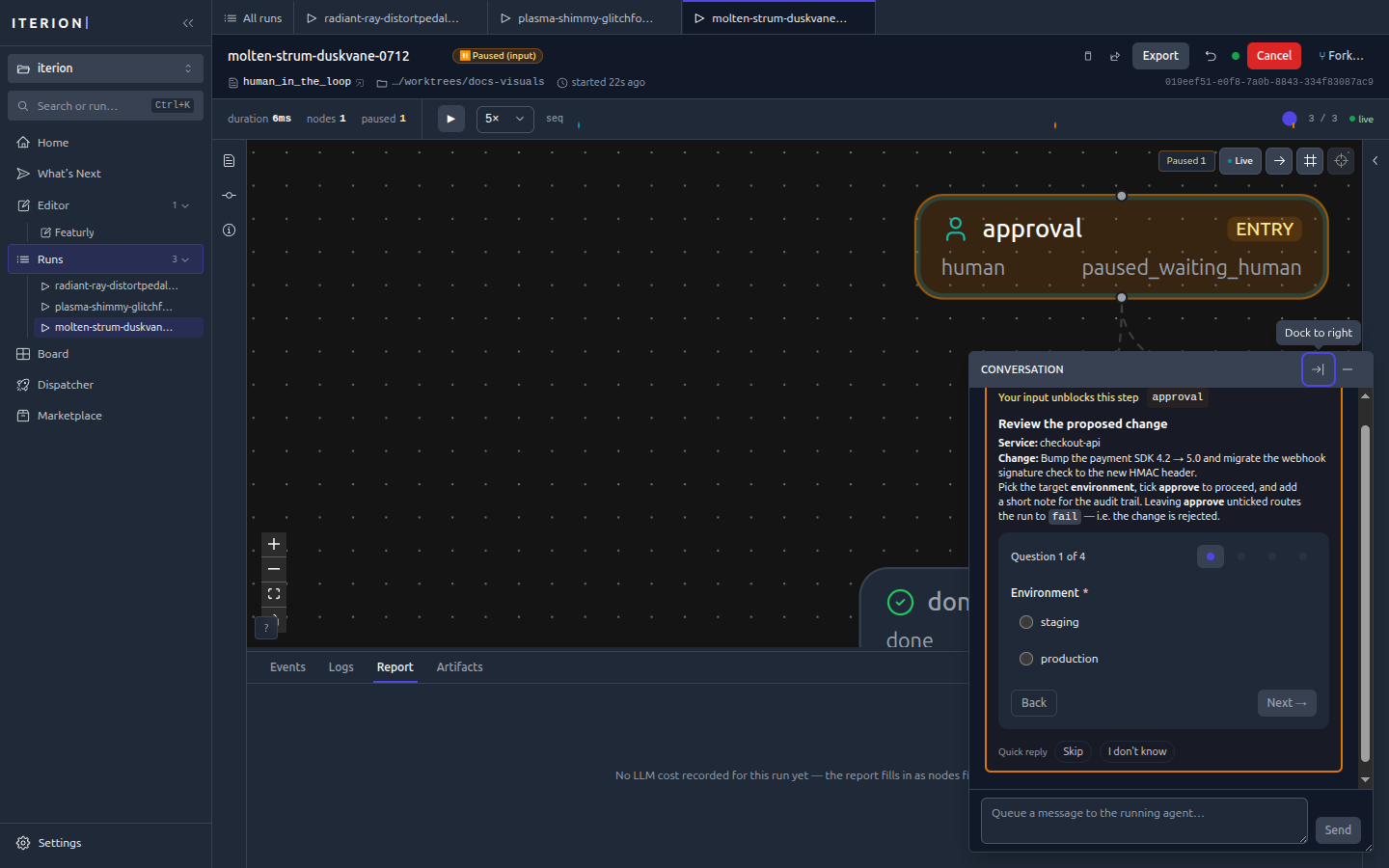
Different field types render their matching widget — a bool as Yes / No, a string as a free-text area:
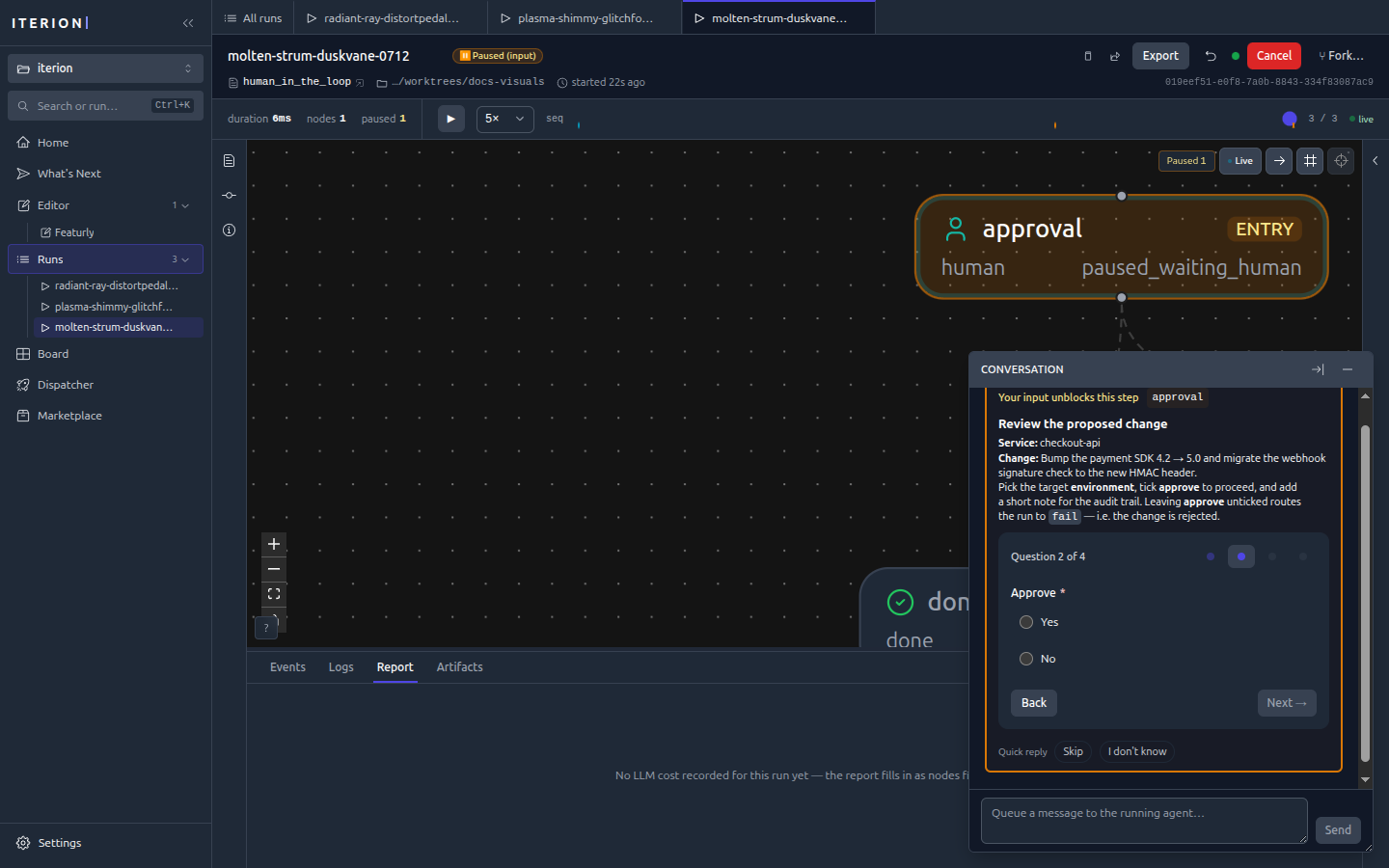
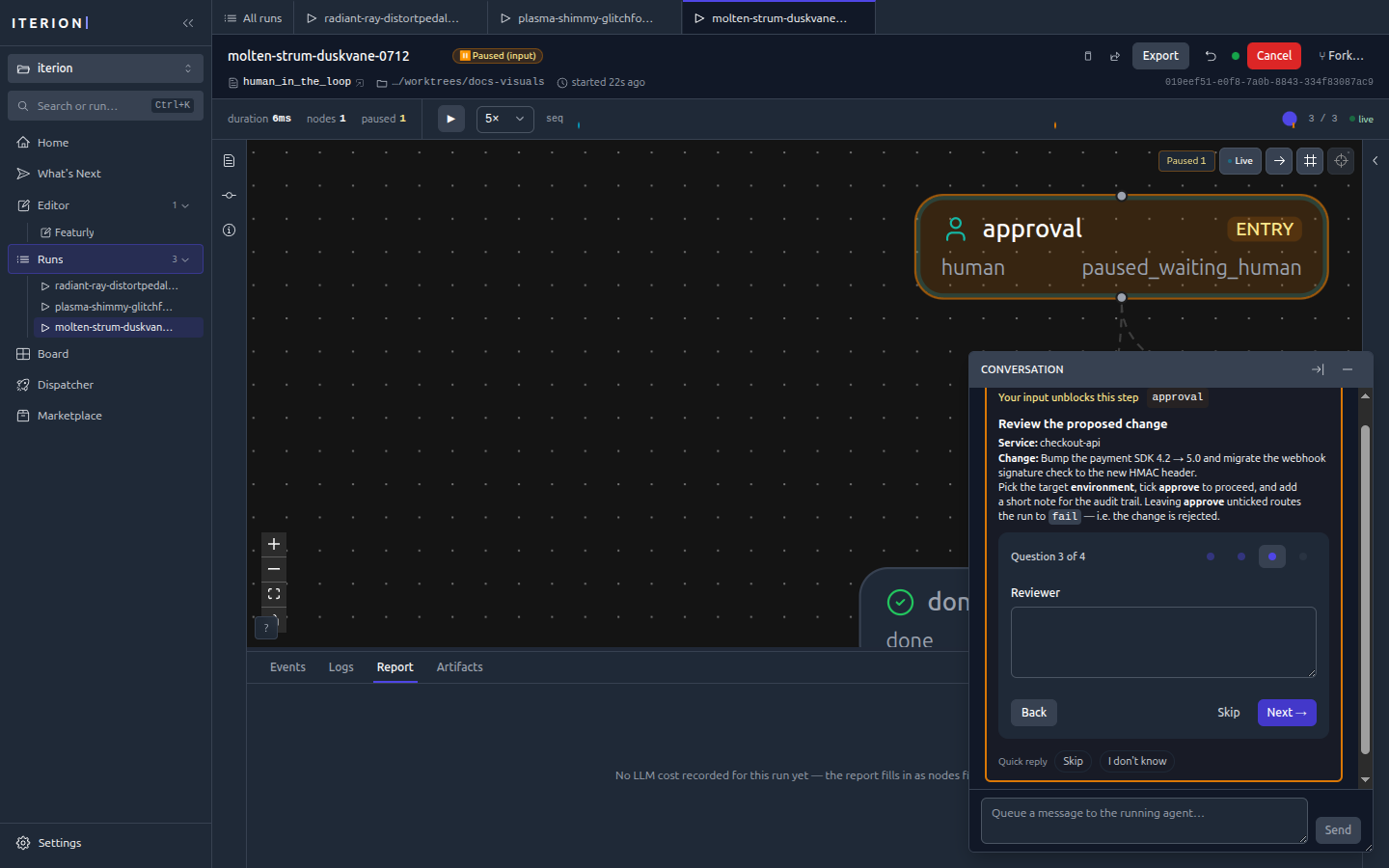
What the operator is validating — the gate's inbound payload
The output schema is the answer. What the gate receives is a separate thing: the engine resolves the node's incoming edges at pause time (with { plan: "{{outputs.plan.body}}" }) and persists the resolved map on the interaction. The studio renders it read-only above the form, under "What you're reviewing" — on the run console, the pipeline board, and the kanban card alike.
agent draft_plan:
  output: plan_out

human approve_plan:
  instructions: approve_instructions
  output: approval_decision

workflow ship:
  entry: draft_plan
  draft_plan -> approve_plan with {
    plan: "{{outputs.draft_plan.body}}",       ## → shown as markdown
    findings: "{{outputs.draft_plan.report}}", ## → shown as folded JSON
  }
This needs no authoring change: any gate that already maps data in gets it. Rendering follows the value's shape — prose as markdown, objects/arrays as collapsible pretty JSON, an operator upload as a real preview (image, audio, video) rather than a path.
Declaring an input: schema on the gate is optional and only sharpens two things: the reading order (the author's field order wins over alphabetical), and the type when the shape is ambiguous — json for a payload that arrived as a JSON string, file for a bare path.
schema review_context:
  plan: string
  findings: json
  mockup: file

human approve_plan:
  input: review_context        ## types the payload; never collected from the operator
  output: approval_decision
Adding
input:to an existing gate is a compile-affecting change. Once a node declares an input schema, every{{input.X}}reference in its prompts is checked against it — anXthe schema does not declare is a hard error (C034, field not found in the node's input schema). So the schema must enumerate every key the node's prompts interpolate, not just the ones you want typed. Leavinginput:off keeps the payload rendering (inferred from each value's shape) with no such constraint.
Two kinds of key are never repeated as review context:
- engine-owned plumbing — queued operator messages, the permission marker, ad-hoc attachments, the
ask_userquestion, the recovery acknowledgement; - anything the gate's
instructions:prompt already interpolates. The engine substitutes{{input.<key>}}into the instructions markdown shown right above, so a gate written the old way (Nexie'schat_instructionsis literally{{input.reply}}) shows that value once, not twice.
Try it — a minimal example
examples/human-in-the-loop.bot is a self-contained demo whose entry node is a human node, so it pauses immediately — no LLM, no tools, free to run:
iterion run examples/human-in-the-loop.bot
# → Status: PAUSED (waiting for human input)

# answer it headless and let it route to done/fail:
iterion resume --run-id <id> \
  --answer environment=staging --answer approve=true \
  --answer reviewer="Ada" --answer notes="LGTM"
…or open the run in the studio (iterion studio) and fill the form in the run console.
Interaction modes
A node's interaction: field decides who answers. The default for a human node is human (always pause); the others let an LLM stand in, fully or conditionally.
| Mode | Behaviour | Use it when |
|---|---|---|
human | Pause for a person. | Approvals, gates, anything needing real judgment. |
llm | An LLM answers automatically; the run never blocks. | Unattended pipelines, chat bots that must not stall (e.g. examples/clarify/main.bot). |
llm_or_human | The LLM answers when confident, else escalates to a human. | Cut routine pauses while keeping a human backstop. |
review | A companion LLM walks a reviewer through testing the change, ending in a squash-merge — see review-merge-gate.md. | Ship gates. |
none | On agent/judge, a mid-step interaction request is rejected instead of pausing. An explicit none on a human node currently follows the normal human-pause path. | Disable interaction capability on LLM nodes; prefer the default human value for human nodes. |
async | On agent/judge, the node posts non-blocking questions via ask_user_async and keeps working; answers arrive in its node-scoped inbox and an await_answers node is the discretionary sync point (ADR-081). | Long-running agents that need a clarification without stalling — see async-interaction.md. |
human_or_host | A human gate that also accepts an answer attested by the host application, on a field the manifest's host_event_field names (POST /api/runs/{id}/host-event); the first source to answer wins. | Chat gates whose answer can come from an action the host completed — see assistant-dock.md. |
On an agent or judge, the synchronous modes (human, llm, llm_or_human, human_or_host) need a backend whose ask_user is wired — claw, claude_code, or pi on its RPC transport. Routed to codex, kimi, grok or opencode the node only receives the interaction protocol as prompt text and runs to completion without ever pausing; C271 warns when the source names one of them, and a route the source does not decide (auto, a {{vars.x}}) is not screened at all.
Modes are also why the same workflow can run fully autonomously in cloud mode (LLM answers) and interactively on a desk (human answers) with no graph changes.
Conversational human gates (Nexie & co.)
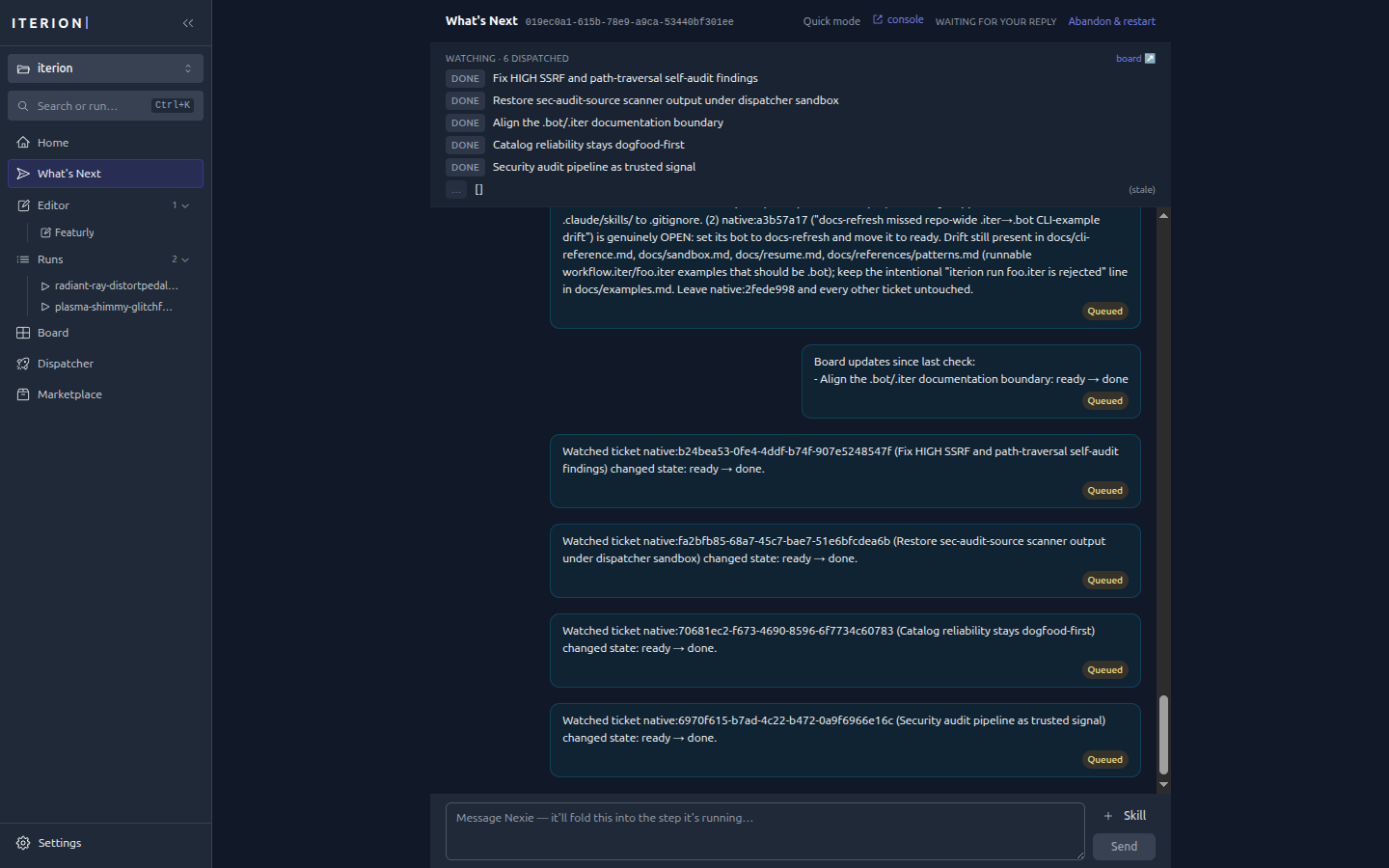
Bots like Nexie (whats-next) use human nodes as a back-and-forth: the studio surfaces the question inline in the run's conversation, you reply in prose, and you can also queue a message to the running agent to steer it mid-step.
Answering a paused run
A paused_waiting_human run is resumable from anywhere:
- Studio — open the run; the form is in the run console's conversation panel. Answer and the run resumes live.
- CLI —
iterion resume --run-id <id> --answer key=value(repeatable) or--answers-file answers.json. Values are coerced to the schema ("true"→bool, enum membership checked). - HTTP —
POST /api/runs/{id}/resumewith the answers map (this is what cloud webhooks and the SDK use), orPOST /api/runs/{id}/answer-humanwith the answers alone — the same resume on the run's recorded workflow, a 409 when the run is notpaused_waiting_human. - MCP —
local_resumewith ananswersobject, on the operator MCP server (mcp-server.md).
Every exchange is persisted to interactions/<id>.json, so the question, the answers, and who answered are all part of the run's auditable record (persisted-formats.md).
Handing the workflow a file
A gate can collect bytes, not just text. The operator picks a file in the run console and the workflow receives a path it can open — no hunting for the right folder on disk, no "drop your track in assets/audio/ and then click resume".
Two shapes, matching the two things an operator actually does.
A declared file field — the workflow knows it needs one
schema music_gate:
  approved: bool
  music: file
  notes: string

human pick_soundtrack:
  output: music_gate
The studio renders a drop zone for music. Downstream nodes read a descriptor:
prompt mix:
  Master the track at {{outputs.pick_soundtrack.music.path}}
  ({{outputs.pick_soundtrack.music.mime}},
   {{outputs.pick_soundtrack.music.size}} bytes).
Fields on the descriptor: path, filename, mime, size, sha256, and attachment (the run-attachment name). The upload also becomes an ordinary run attachment, so {{attachments.pick_soundtrack.music}} works too.
A file field only makes sense on a node that actually pauses for an operator — nothing else in the engine can produce bytes — so the compiler rejects it (C129) on any non-human node, and on a human node whose interaction never collects operator bytes: interaction: llm (a model auto-answers, so it can only invent a path) and interaction: review (the output is the engine-built verdict map). llm_or_human stays allowed: it can escalate to a real pause, which is how the file arrives.
file fields are optional: the DSL has no per-field required marker, and forcing one would strand an operator re-answering a gate whose file arrived on an earlier pass. Branch on the field if the workflow truly cannot proceed without it.
Showing the operator a file the workflow produced
The sections above collect bytes from the operator. The reverse — putting a generated deliverable in front of them — goes through the same attachment store: a tool node prints [iterion] attachment=<path> name=<n> on stdout, the runtime persists the file, and the gate's inbound payload previews it: images, audio and video as media; JSON, markdown and other text inline (folded when long). .xml / .html / .svg / .js stay a download (neutralizeActiveMIME downgrades them; the studio keeps the same carve-out). Anything else stays a download. See attachments.md.
A path alone is never enough: it points at the host or the sandbox bind-mount, and no browser can fetch either.
Ad-hoc attachments — no DSL at all
Every ordinary human gate carries a 📎 Attach a file button, whether or not its author anticipated one. This is the "here's a diagram explaining what I mean" case: feedback is much cheaper to give as a sketch than as three paragraphs describing the sketch.
Not review gates. interaction: review renders through a different form (approve / request changes / merge) with no attach affordance, and its resume builds the verdict itself rather than carrying the operator's answers — so _attachments never reaches the workflow there, even from the API. Use an ordinary gate when you need the operator to hand over files.
Those land on the reserved _attachments answer key as a list of the same descriptors:
prompt apply_feedback:
  {{outputs.review._attachments}}
From the CLI
Prefix the value with @:
iterion resume --run-id <id> \
  --answer music=@./theme.mp3 \
  --answer approved=true
The @ convention applies only to answers the paused node declares as file-typed — every other answer reaches the workflow verbatim, so a chat mention (@channel), an npm scope (@acme/pkg) or a @v1.2 ref passes through untouched. Within a file field, a literal leading @ is escaped as @@. The attachment gets the same name it would from the studio, so a bot's {{attachments.<node>.<field>}} reference does not care which surface answered the gate.
Limits
Uploads pass the same gate as launch-time attachments: server-sniffed MIME against the allowlist (images, audio, video, pdf, text, json, yaml, archives), --max-upload-size per file (50 MB web, 1 GB desktop) and --max-total-upload-size per submission. --max-uploads-per-run is counted against the run's existing attachments plus the batch being promoted, so a gate answered repeatedly (a loop) cannot grow the run's attachments without bound. See attachments.md.
See also
- dsl.md —
humannode +interaction:syntax reference - resume.md — pause/resume/failure matrix
- review-merge-gate.md — the
interaction: reviewgate - visual-editor.md — the run console that renders forms